Give your Desktop a Mozaic Touch

Experience the Windows 8 Metro Stlye UI on your Computer

Windows 7 God Mode

Get an Advanced Control Panel in Windows7 by enabling God Mode

Download Internet Explorer 9

Enjoy The Internet in a New and Secure Way

Microsoft Office 2010 Professional Activation

Activator for Microsoft Office 2010 Professional 100% Working..!!

Flash Wallpapers for Mobile

More than 175 Flash/SWF wallpapers for Mobile with System Info

Tuesday, November 30, 2010

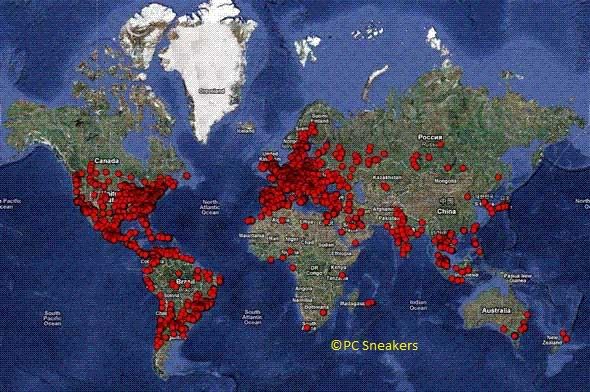
Kroxxu botnet affected over one million web users.

     A new botnet has been detected which could have potentially affected over a million web users in the last 12 months.

     The Kroxxu botnet currently has its grip on around 100,000 web domains and has been spreading password-stealing malware whilst covering its tracks extremely effectively, avast! Virus Lab found.

     The surreptitious nature of the botnet meant researchers were unable to determine how the masterminds had monetised the operation. “There are a number of ways they could be supporting themselves,” said Jiri Sejtko, head of virus research at the avast! Virus Lab.

     “The four most likely methods are through selling hacked space on infected servers, use of this malware to support the activities of other, more directly profitable malware, selling stolen credentials, or using keyloggers to spread other spam.”

     Kroxxu differs from traditional botnets, as its expansion has been achieved solely through infected websites. It’s owners gained passwords to take control of websites, before making alterations to the site’s content in order to upload and modify files on infected servers, avast! explained.

     The operators then spread the botnet to other servers across the world. Kroxxu has used redirectors in order to make it difficult to track the botnet’s activities. The security company estimated over 10,000 redirectors had been employed by Kroxxu over the last year.

     The malicious network also used alterable components, as each layer of the botnet performs a specific task, giving it greater flexibility. “Kroxxu’s indirect cross infections are based on the fact that all parts [are] equal and interchangeable,” explained Sejtko.

     “If one part is used as an initial redirector, it may also be used as a final distribution part at the same or even a different time. This gives it an enormous range of designed-in duplicity.”

     Kroxxu could spread to gain much more traction, avast! said. URL blocking engines may struggle to differentiate between standard malware distribution domains run by the malware authors and hacked zombie domains like those controlled by Kroxxu, the security firm explained.

     There have been a number of successful botnet takedowns this year, which led to a drop in spam in the last quarter.

Facebook "news feed" are actually malware!!!

    
Security company BitDefender has said today that 20 percent of posts that Facebook users see on their "news feed" are actually malware.

     60 percent of those attacks come from third-party apps. 22 percent of the malware apps say they will help you see who has been viewing your profile, 15 percent offer "extras" for games you might have like FarmVille, 11 percent offer a "dislike" button (it doesn't exist) and another 7 percent offer links to games.

     BitDefender collected its data through the SafeGo Facebook app, which scans user's accounts for malware. SafeGo was launched last month and has 14,000 users.

     So far, the software has scanned 17 million posts. Websense's security tool Defensio says that 1 in every 10 updates that have a link lead to malware.

Configure Email on your cell phone : The Tutorial

These days almost all the phones from low-end to high-end if multimedia enabled support the Email function with an inbuilt phone application in the messages menu which we hardly use or notice. If you these applications are fantastic and work just very fine if configured correctly. 
The question here is most of us often don't know how to configure Email accounts and retrieve and send your mails without actually starting the phone browser or third party application.
The first step in using email on your mobile phone is to define your email account’s settings so that  your mobile phone knows which server to contact and to login using the correct credentials.  

You can follow these steps. Irrespective of the phone models these field remain the same. However accessing the Email setup wizard may vary in different models.

1. In the Messages menu go to settings. look for Email settings
2. Go to Email Accounts/Profiles and create a new profile.
3. Name it according to the server your using. eg : Gmail

Now note these fields as these are important for email working process.
Here we are illustrating Gmail account setup
  • SMTP server : smtp.gmail.com
  • SMTP port : 465
  • Secure Connection : SSL (Optional)
  • Incoming email server type : POP3
  • POP3 server : pop.gmail.com
  • POP3 port : 995
  • Enter ur email address in my email address     option
  • User Name/Password : Your Gmail credentials
  • If there is an option for SMTP authentication enable it
  • Save this account and activate it in the sending and receiving options.
*imp : Set your GPRS/EDGE profile same as you use for your browser depending on plans and operators respectively.


For Other email accounts like yahoo, msn, etc you can create new accounts by changing the SMTP and POP/IMAP servers.
Now when you go to the new message/create message option, you can see email and you can now actually send emails from your message menu and retrieve them in the message inbox respectively