Give your Desktop a Mozaic Touch

Experience the Windows 8 Metro Stlye UI on your Computer

Windows 7 God Mode

Get an Advanced Control Panel in Windows7 by enabling God Mode

Download Internet Explorer 9

Enjoy The Internet in a New and Secure Way

Microsoft Office 2010 Professional Activation

Activator for Microsoft Office 2010 Professional 100% Working..!!

Flash Wallpapers for Mobile

More than 175 Flash/SWF wallpapers for Mobile with System Info

Wednesday, November 3, 2010

0-day buffer overflow in Adobe Reader and Acrobat

     A buffer overflow occurs when a program or process tries to store more data in a buffer (temporary data storage area) than it was intended to hold. Buffers are created to contain limited amount of data. Therefore, the extra information has to go somewhere, and hence it overflows into adjacent buffers, corrupting or overwriting the valid data held in them. Buffer overflow is an increasingly common type of security attack on data integrity. For example, it damages the user's files, change data, or disclose confidential information.

      

      A critical vulnerability exists in Adobe Reader 9.3.4 and earlier versions for Windows, Macintosh and UNIX, and Adobe Acrobat 9.3.4 and earlier versions for Windows and Macintosh. This vulnerability (CVE-2010-2883) could cause a crash and potentially allow an attacker to take control of the affected system. There are reports that this vulnerability is being actively exploited in the wild. Adobe is in the process of evaluating the schedule for an update to resolve this vulnerability.

    
Affected software versions:
Adobe Reader 9.3.4 and earlier versions for Windows, Macintosh and UNIX, and Adobe Acrobat 9.3.4 and earlier versions for Windows and Macintosh.


Remote Sign out and last login tracking feature In Gmail

     If you suspect that someone is intercepting your email or your Gmail account is hacked or your are victim of phishing, then there is a good news for you. Now Google has added a new layer of information and control. With this new feature, you can keep a track of your recent sessions and you can also sign yourself out remotely.
     At the bottom of your inbox, you'll see information about the time of the last activity on your account and whether it's still open in another location:

     Using the feature, you can determine or verify if your mailbox was opened from another location.
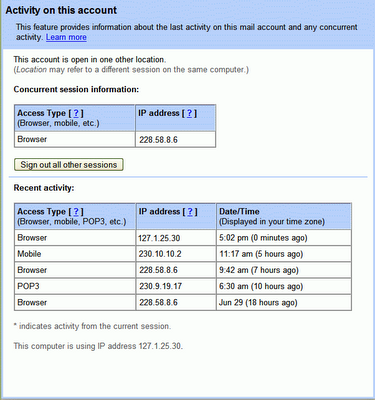
You can get more details about your recent activity by clicking on the Details link:


      The top table, under "Concurrent session information," indicates all open sessions, along with IP address and "access type" -- which refers to how email was retrieved, (for example, through iGoogle, POP3 or a mobile phone). The bottom table, under "Recent activity," contains my most recent history along with the time of access. You can also view your current IP address at the very bottom of this window, where it says "This computer is using IP address..."

      With this information, you can quickly verify that all the Gmail activity was indeed yours. If you remember your past login time and if you have forgot to logout then you can also click on the "Sign out all other sessions" button to sign out of the account you left open at home.

Tuesday, November 2, 2010

GOD Mode in Windows 7 makes Using Control Panel Easy

Windows 7 has changed Control Panel a little, but it's still too difficult to locate all the applets and options that you might need. God Mode, however, while not being particularly godlike, does offer an easier way to access everything you could want from a single folder.

To try this out, create a new folder and rename it to:

God Mode.{ED7BA470-8E54-465E-825C-99712043E01C}

The first part, "God Mode" will be the folder name, and can be whatever you want: "Super Control Panel", "Advanced", "God Mode" if you prefer.


The extension, ED7BA470-8E54-465E-825C-99712043E01C, must be entered exactly as it is here, though, including the curly brackets. When you press [Enter] this part of the name will disappear, and double-clicking the new folder will display shortcuts to functions in the Action Centre, the Network and Sharing Centre, Power options, troubleshooting tools, user accounts and others - more than 260 options in total.